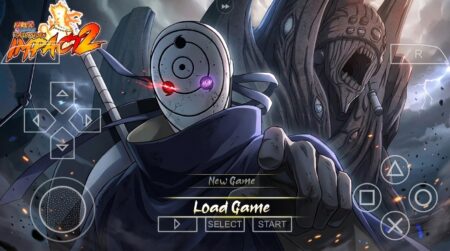
Some mods just reskin a game. The Naruto Ultimate Ninja Revolution Mod went further than that. When this Naruto Ultimate Ninja Revolution Mod showed up back in 2019, it took Naruto Shippuden Ultimate Ninja Impact, the PSP brawler everyone already knew, and rebuilt its whole presentation to look like Naruto Shippuden Ultimate Ninja Storm Revolution. New menu, new maps, new textures, new attacks. Same Impact engine underneath, but it felt like a different game.

That is exactly why people still search for the Naruto Ultimate Ninja Revolution Mod. Storm Revolution never came to PSP, so this mod was the closest thing PSP and Android players ever got. If you missed it the first time around, here is what this mod is, how it plays, and how to get it running today.
What This Naruto Ultimate Ninja Revolution Mod Actually Is
Let us clear up the confusion first. There is no official Naruto Storm Revolution on PSP. This is a fan-made total conversion of Naruto Shippuden Ultimate Ninja Impact (the 2011 PSP game by CyberConnect2). The modder kept Impact’s combat engine, the one with the big mob battles and the cinematic boss fights, and layered Storm Revolution style visuals over the top.

The result plays like Impact but looks like Revolution. You pick a fighter, run through story-style battles, and pull off ultimate jutsu with the flashy presentation the Storm series is known for. It is not a port. It is a tribute built inside a PSP game.
The Storm Revolution Menu and Maps
The first thing you notice is the menu. The mod replaces Impact’s standard interface with a menu styled after Storm Revolution, and that alone changes how the game feels. Everything from character select to the battle setup screens carries the Revolution look.

The maps got the same treatment. The mod ships with new Revolution-style battle maps and textures, so the arenas do not look like the stock Impact stages. Combined with the reworked character textures, fights have a noticeably different flavor from the base game. It is still the PSP hardware doing the work, so do not expect console graphics, but on a phone screen through PPSSPP the upgrade is obvious.
Roster: Who You Can Play in the Revolution Mod
The Naruto Ultimate Ninja Revolution Mod expands the playable roster with many new characters beyond what the base Impact game offered. The focus is on the Shippuden-era cast that Storm Revolution players would recognize, with new character models and textures replacing the older ones.

What makes the roster fun is not just the headcount. Characters come with reworked attacks and new ultimate jutsu animations styled after the Storm series. If you main someone like Naruto, Sasuke, or Kakashi, you will feel the difference the moment you land a jutsu. The combos flow the same way Impact players remember, but the visual payoff is bigger.
- Expanded Shippuden-era roster with new character models
- Reworked attacks and ultimate jutsu animations
- Storm Revolution style battle maps and arena textures
- Full menu overhaul matching the Revolution look
- Same Impact combat engine underneath, so it stays familiar
Setting Up the Textures the Right Way
This part trips up almost everyone, so read it twice. The Naruto Ultimate Ninja Revolution Mod comes in two pieces: the game ISO and the mod menu/textures pack. The ISO goes in your PSP/GAME folder like any other PSP game. The textures pack goes into a TEXTURES folder inside your PSP directory.
If the mod menu does not show up, nine times out of ten the texture folder is in the wrong place or named wrong. Create the TEXTURES folder yourself if it is not there, drop the mod’s texture folder inside it, and make sure PPSSPP has texture replacement turned on in the settings. Then switch your emulator language to American Latin if the menu text looks broken, that was a known quirk of this mod.
Performance-wise, the Naruto Ultimate Ninja Revolution Mod is light. The original release notes said it runs fine on 2GB RAM devices, and that holds up. PPSSPP handles Impact-based mods well because the base game was built for real PSP hardware. If you get slowdowns, drop the rendering resolution to 1x or 2x PSP and turn on frameskip.
How to Download the Naruto Ultimate Ninja Revolution Mod
Getting the mod running takes a few minutes. Follow the steps in order and do not skip the texture part.
- Install PPSSPP. Grab the emulator from the official PPSSPP site or the Play Store, then open it once so it creates its folders.
- Wait for the countdown timer to finish and your download link will appear. Then grab both the game ISO and the mod textures pack.
- Install a file manager. ZArchiver works best for extracting the downloaded archives.
- Extract the ISO and move it to Internal Storage/PSP/GAME.
- Extract the mod textures and move the texture folder to Internal Storage/PSP/TEXTURES (create the folder if it is missing).
- Enable texture replacement in PPSSPP settings under Tools, then launch the game from the Games tab.
Looking for more Naruto mods in the same style? Check out the Naruto Ultimate Ninja Storm 4 mod for PPSSPP and the Naruto Ultimate Ninja Storm 3 mod for PPSSPP for two more Impact-based conversions.
If you are coming from the regular Impact game, give yourself a few matches to adjust. The timing is identical, but the new effects can make familiar jutsu look like they behave differently. They do not. Your muscle memory still applies, which means Impact veterans will feel at home within minutes while enjoying a much fresher look.
Naruto Ultimate Ninja Revolution Mod FAQ
Is this the real Storm Revolution on PSP?
No. It is a fan mod of Naruto Shippuden Ultimate Ninja Impact restyled to look like Storm Revolution. The real Storm Revolution only released on PS3, Xbox 360, and PC.
Do I need the original Impact ISO?
The mod is distributed as a pre-modded package, so you install it as its own game. You still need PPSSPP to run it.
Why is my menu showing broken text?
Switch the PPSSPP system language to American Latin. This was a documented quirk of the original mod release.
Will it run on a low-end phone?
Yes, this is one of the lighter Naruto mods. The base game was built for real PSP hardware, so most modern phones handle it without trouble.
Can I play it on PC?
Yes. PPSSPP has a Windows version, and the same ISO and texture folders work there.
Still Worth Playing in 2026?
Honestly, yes, if you like the Impact combat style. The Naruto Ultimate Ninja Revolution Mod remains one of the cleanest total conversions in the scene, and few fan projects from that era hold up this well. It does not add anything the series did not already have, but it packages the Revolution look onto a game your phone can actually run. For a free fan project from 2019, that is still a pretty good deal.