
Before Dragon Ball fighting games went 3D, there was a golden age of 2D sprite fighters, and the Dragon Ball Z Hyper Dimension Mugen game is a love letter to that era. Built on the Mugen engine, it is a free fan-made fighting game starring the Z fighters, and it runs on both PC and Android. If you want the classic emulator experience on your phone, grab PPSSPP too, since this site’s PSP mods all run on it.
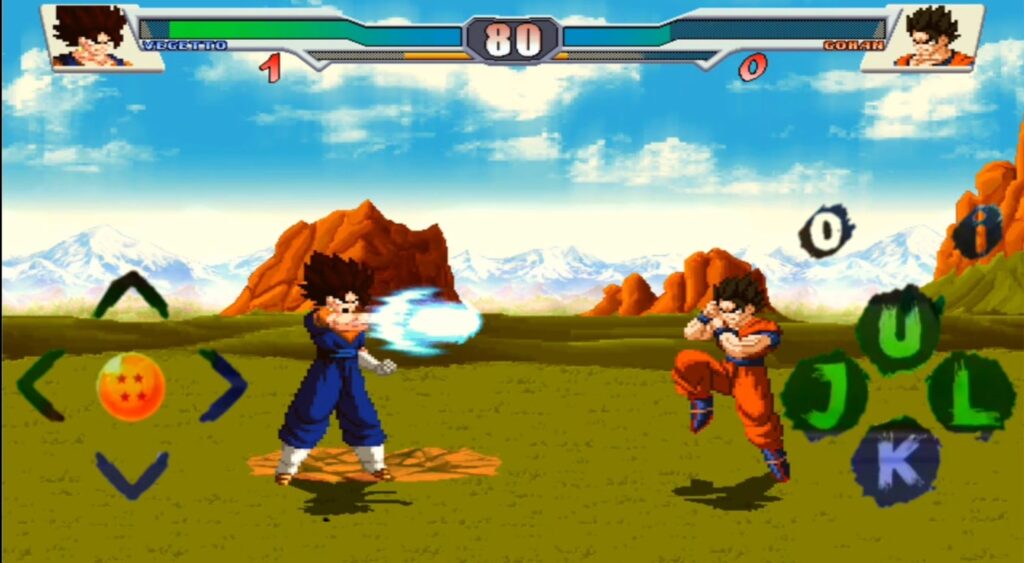
Mugen games have a cult following for a reason. They are tiny, they run on almost anything, and they scratch that arcade fighting itch perfectly. If you grew up on 2D fighters, this one will feel like home.
What Is Dragon Ball Z Hyper Dimension Mugen?
The Dragon Ball Z Hyper Dimension Mugen game is a fan-made 2D fighter built with the Mugen engine, a free toolkit that lets creators build their own fighting games. This one is based on the Dragon Ball Z series and focuses on the core Z cast doing what they do best: fast combos, energy blasts, and dramatic transformations.

Do not confuse this with the official 1996 SNES game called Dragon Ball Z: Hyper Dimension. That is a different game entirely. This is a Mugen fan project that borrows the name and the spirit, rebuilt by fans for modern devices.
What makes Mugen games special is how light they are. We are talking about a game that takes up very little space and runs on old laptops without breaking a sweat. Compare that to modern 3D fighters that need gigabytes of storage, and you start to see the appeal.
Characters and Roster
The Dragon Ball Z Hyper Dimension Mugen roster covers the main Dragon Ball Z characters. You will see Goku, Vegeta, and the familiar faces from the Z era, including the Goku and Vegeta fusion that fans always want to play. The roster is not the biggest in the Mugen scene, but every character here has new attacks and animations that feel right for the series.
Each fighter comes with their signature moves. Expect Kamehamehas, Galick Guns, and the kind of screen-filling super attacks that defined 2D Dragon Ball games. The sprite work has that classic Mugen look: chunky, colorful, and full of energy. It will not win any graphics awards in 2026, but it has charm that modern games sometimes lack.
If you want a Mugen game with a bigger roster, check out the Dragon Ball Fighter Z Mugen game on this site. But if you want something focused and quick to pick up, the Dragon Ball Z Hyper Dimension Mugen game is the easier choice.
Game Modes
The Dragon Ball Z Hyper Dimension Mugen game includes several modes to keep things interesting:
- Arcade mode. Fight through a ladder of opponents, classic fighting game style.
- Versus mode. Play against a friend on the same keyboard or controller. This is where Mugen games shine.
- Team battles. Set up team fights and swap between fighters.
- Training mode. Practice combos and learn each character’s move list without pressure.
The versus mode is honestly the main event. Mugen games were made for couch multiplayer, and this one is no different. Plug in two controllers or share a keyboard and you have an instant tournament.
Graphics and Sound
Let us set expectations fairly. The Dragon Ball Z Hyper Dimension Mugen game looks like a Mugen game. The sprites are 2D, the backgrounds are static or lightly animated, and the effects are old-school. But the animations are snappy, the hit effects feel punchy, and the whole thing moves at a speed that keeps fights exciting.
Sound follows the same philosophy. You get punchy hit sounds, energy blast effects, and music that fits the DBZ mood. It is not a remastered soundtrack, but it does the job. Play it with headphones and you will be surprised how much atmosphere a tiny game can create.
How to Download Dragon Ball Z Hyper Dimension Mugen
- Scroll down and tap the Download button below.
- Wait for the countdown timer to finish and your download link will appear.
- Download the game archive to your device.
- Extract it with any archive app (ZArchiver on Android, or the built-in tools on Windows).
The game comes as a compressed folder. There is no installer and no setup wizard, which is typical for Mugen games. You just extract and run.
How to Install and Play on PC
Playing the Dragon Ball Z Hyper Dimension Mugen game on PC could not be simpler:
- Extract the downloaded folder anywhere you like.
- Open the folder and look for the game’s executable file.
- Double-click it. The game launches immediately, no installation needed.
- Use the keyboard to navigate menus. Arrow keys move, and the default keys handle punches, kicks, and specials.
For the best experience, plug in a USB controller. Mugen supports controllers natively, and fighting games are always better on a pad or stick. You can remap every button in the options menu.
How to Play on Android
Android takes a little more work because Mugen is a Windows engine. You have two realistic options:
- Winlator or ExaGear. These apps let you run Windows programs on Android. Install one, copy the extracted Mugen folder into it, and launch the executable. Performance varies by phone, but this lightweight game runs well on most mid-range devices.
- Play on PC instead. Honestly, if you have any Windows laptop or desktop, the PC experience is smoother. The game is so light that even a ten-year-old laptop handles it.
There is no native Android APK of this specific Mugen build, so do not trust random sites offering one. They are usually repackaged fakes or worse.
Controls and Tips for Beginners
New to Mugen? Here is a quick primer:
- Learn one character first. Pick Goku or Vegeta and learn their specials before jumping between fighters.
- Blocking matters. Hold back to block. Mugen AI can be aggressive, and blocking buys you time to learn patterns.
- Use training mode. Every character has hidden combos. Ten minutes in training mode saves you a lot of frustration.
- Turn on the move list. Check the game’s documentation folder for character move lists if the in-game help is thin.
Why Mugen Games Are Still Worth Playing
It is fair to ask why anyone should play a tiny fan-made fighter in 2026. The answer is simple: Mugen games are fun in a way that is hard to replicate. There is no grinding, no battle pass, no 50GB download. You extract a folder, double-click, and you are fighting within a minute. The Dragon Ball Z Hyper Dimension Mugen game captures that perfectly.
They are also preservation. The Mugen scene has kept 2D Dragon Ball fighting alive for decades, long after official 2D DBZ games stopped coming out. Every download keeps that scene going.
FAQ
Is Dragon Ball Z Hyper Dimension Mugen free?
Yes. It is a free fan-made game built on the free Mugen engine.
Is this the official SNES Hyper Dimension game?
No. This is a fan-made Mugen project. The 1996 SNES game by Bandai is a separate official title.
Can I play it on Android?
Not natively, but you can run it through Winlator or ExaGear on Android. The smoothest experience is on PC.
Does it need a powerful PC?
Not at all. The game is extremely light and runs on very old hardware.
Can I play multiplayer?
Yes, local versus on the same screen. There is no online multiplayer.
Is it safe?
Mugen games run as normal programs with no installer. Grab it from the link on this page and avoid sketchy repack sites.
Final Words
The Dragon Ball Z Hyper Dimension Mugen game is a small, honest piece of fan work. It will not replace your modern fighters, but it does not try to. It is a quick, free, fun 2D Dragon Ball fighter that respects your time and your storage space. If that sounds good, give it a download.





1 Comment
Thanks very nice blog!