Dragon Ball Xenoverse 2 is one of the best modern Dragon Ball games, but it never came to PSP or Android, and it needs serious hardware to run well. The Dragon Ball Xenoverse 4 mod is the modding community’s answer: a Tenkaichi Tag Team conversion on PSP that recreates the Xenoverse look and feel. It runs on Android through PPSSPP, and it is free to play.

This is the fourth entry in the fan-made Xenoverse mod series, following the Xenoverse 3 mod. Each version has added more characters and polish, and the Dragon Ball Xenoverse 4 mod is the biggest one yet, with Tournament of Power fighters, Heroes characters, and a full Xenoverse-style interface.
What the Dragon Ball Xenoverse 4 Mod Brings
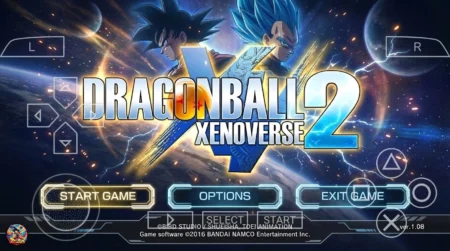
The Dragon Ball Xenoverse 4 mod rebuilds TTT around the Xenoverse 2 aesthetic. The interface is the first thing you notice: menus, character select, and HUD elements are all redesigned to match Xenoverse 2’s style. It changes the whole feel of the game before you even throw a punch.

Underneath that interface is a serious roster upgrade. The mod pulls fighters from across the modern Dragon Ball era, with new transformations and ultimate attacks throughout. It is designed to feel like playing Xenoverse on a phone, and it gets surprisingly close. Longtime TTT players will notice the difference immediately, from the character select screen to the way special moves are presented.
Roster: Tournament of Power and Beyond
The character list is the star of the Dragon Ball Xenoverse 4 mod:

- Tournament of Power fighters with their latest transformations
- Super Dragon Ball Heroes characters like Cumber and Hearts
- Dragon Ball Super Broly, Gogeta, and Vegito with new forms
- Dragon Ball GT characters and classic Z-era fighters
- Future Gohan and Trunks with all their transformations
- Every version of Goku and Vegeta you could want
You can play as characters from any Dragon Ball universe and take them across different planets and stages. With all the new ultimate attacks included, every fighter feels distinct, and discovering new team combinations is half the fun of this mod. It keeps every session feeling fresh.
Xenoverse-Style Interface
What sets this mod apart from other TTT conversions is how far it goes with the presentation. The Dragon Ball Xenoverse 4 mod does not just add characters; it reskins the experience. The new interface changes how the game looks and navigates, taking it to another level compared to the base TTT game.

Combined with the improved 3D graphics and effects, the result is a mod that genuinely captures the Xenoverse vibe. It is an action-packed, visually strong package that works well on mobile screens. Even small details like loading screens and victory poses got the Xenoverse treatment, which shows how much care went into this conversion. It is the kind of mod where you keep noticing new touches the longer you play, from the way the HUD animates to the character portraits on the select screen.
Exploring Planets and Missions
The Dragon Ball Xenoverse 4 mod gives you room to roam. You can take your chosen fighters across different planets and stages, fighting powerful enemies in varied environments. It captures some of that Xenoverse adventure feel, where the journey matters as much as the individual fights.

The action stays fast and packed. Battles flow from one to the next with the kind of pacing Xenoverse fans expect, and the new ultimate attacks keep encounters exciting. Whether you are a series veteran or trying a Xenoverse-style game for the first time, the structure is easy to pick up and hard to put down.
A Quick Honest Note
Let us be straight about one thing: this is a fan mod, not the real Xenoverse 2. Some sites claim you can download the actual Xenoverse 2 as an Android APK, and that is not real. The real game needs a console or gaming PC. The Dragon Ball Xenoverse 4 mod is the honest alternative: a TTT mod that recreates the Xenoverse experience on hardware you already own. If you played the Xenoverse 3 mod, this is its bigger, better follow-up.
How to Download the Dragon Ball Xenoverse 4 Mod
Here is how to get the Dragon Ball Xenoverse 4 mod on your phone:
- Tap the download button below to get the EvolutionOfGames app, which gives you access to the mod files.
- Wait for the countdown timer to finish and your download link will appear.
- Download the ISO file and the menu pack with any browser.
- Extract the files with a RAR app from the Play Store if you need one.
How to Install It on PPSSPP for Android
Installation only takes a few minutes:
- Install the PPSSPP emulator from the Play Store. It is free.
- Copy the menu folder (ULUS10537) into the PSP/TEXTURES folder on your device, creating the folder if needed.
- Open PPSSPP and set the language to America Latina if menu text looks wrong.
- Browse to the extracted ISO, select it, and start playing.
Crash Fixes and Performance Tips
If the game crashes, the usual fix applies: in PPSSPP, go to Settings, then System, and disable Fast Memory (unstable) and Multithreaded. Those two options are behind most crashes with TTT mods.
For lag during big fights, lower the rendering resolution to 2x PSP and enable Auto frameskip. Close background apps too. These settings keep the Dragon Ball Xenoverse 4 mod running smoothly on most phones.
More Xenoverse-Style Mods
If you enjoy this one, the Dragon Ball Xenoverse 3 mod is the direct predecessor and still worth playing. For a different flavor of modern Dragon Ball on PPSSPP, the Dragon Ball Sparking Zero mod brings a fresh roster with the same easy setup.
FAQs
Is this the real Xenoverse 2 for Android?
No. It is a fan-made TTT mod styled after Xenoverse 2. The real game is only on consoles and PC.
What is new compared to the Xenoverse 3 mod?
More characters, including Tournament of Power and Heroes fighters, plus a more polished interface and better effects.
Can I play it on Android?
Yes. Install PPSSPP from the Play Store and load the ISO.
Does it work offline?
Yes. Once installed, the game is fully offline.
The game crashes on startup. What should I do?
In PPSSPP, go to Settings, then System, and turn off Fast Memory and Multithreaded.
Is the interface really like Xenoverse 2?
Yes. The menus, character select, and HUD are all redesigned in the Xenoverse 2 style. It is one of the mod’s biggest features.
Can I play it on PC?
Yes. The same ISO file runs in PPSSPP on Windows.